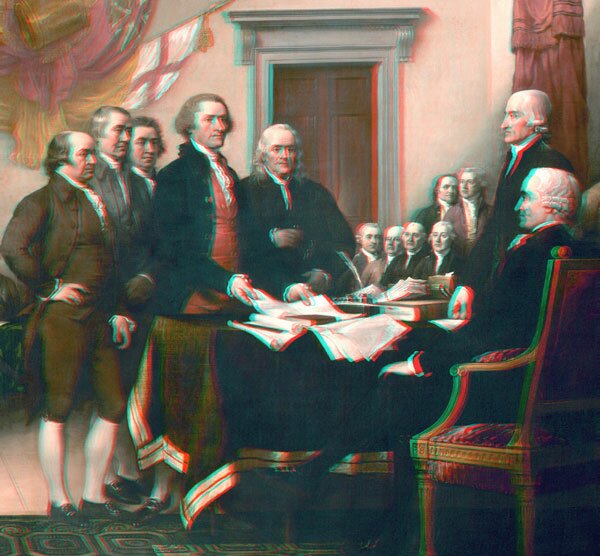
Starting with the famous John Trumbull painting of the signing of the Declaration of Independence, I turned it (or a detail from it, anyway) into a 3D anaglyph by using a "depth map" as a displacement map in Photoshop.

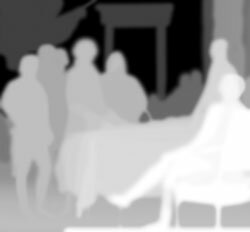
The "depth map" is a separate file the same size as the flat image, with various shades of gray to indicate the depth of every part of the image. White is closest, black is farthest. Using this as a displacement map in Photoshop on the flat image -- with a negative X offset for the red channel and a positive X offset for the green and blue channels -- turns it into a 3D anaglyph.


 Subscribe to this blog's feed
.jpg)
Hello again … I made this for your daughters, Abby and Faith: »the fairy in the mist«
This 3D view is based on a picture of a schoolgirl, 12 years old. I turned it into a 3D anaglyph by using the red channel and the displacement-filter in Photoshop. –You post excellent examples … – best wishes – khnemo
Wow, thanks, khnemo! Meine Töchter lieben es!
Hi Sean,
Want to do something in 3d images for my school project, was wondering if you could help with some information.
How do I use the depth map in photoshop? Is there an easier way of creating a depth map? How do I shift the channels?
A little confused here.
Thanks Kane
Howdy, Kane.
When is your project due? I am actually putting together the world’s best, comprehensive step-by-step tutorial on making and using depth maps for anaglyphs, with sample files and screen shots and everything. But it won’t be ready to post here until this weekend.
Hi Sean,
Pls do post the tutorial, I havent seen anything like this (3d tutorial with depth map) in the web, and its amazing that you can do this with a 2d , flat image
Rey
Hi Sean, I followed your example and converted with depth map: 2d-in-3d-ubertragung-eines-gemalten-bildes – best wishes - khnemo
Hello,
using the example images above, I used Filter>Distort>Displace in Photoshop and displaced the red channel (horizontal scale is -2 and vertical scale 0) then did the same thing with green channel but horizontal scale is 2 (not negative 2) and achieved the same effect
Remember to set the displacement map to stretch to fit and set the undefined areas to Wrap around (coz default setting is repeat edge pixels (important setting).
Exciting stuff! Thanks for showing the way!
Rey Mendoza
I tried to sign up and was told my password was wrong…when I gave it the hint phrase, I was told it was wrong. I backtracked the pages to my input and I had, indeed, at least entered the hint phrase correctly.
I was hoping to find out if the tutorial was ever posted and where, and if not, if I could get the information as I have a project for a company to convert color illustrations to stereoscopic anaglyphs and would really like to know how to create the depth maps and apply them, please, at your earliest convenience. Thank you.
Hi, Sean I’ve got the same problem ! I can’t make 2D to 3D so I’m wating for this tutorial too. please make it :) thanx
Fil
Was this tutorial ever posted . I would really like to see how this was done. Specially how the Depth Map was created.
Me too.. would love to see a tutorial about Depth Maps. Pretty please T Jackson
Hi I really need some help converting my paintings to 3d. They are very detailed and full of color. I think it might be a bit of a challenge but I’m willing to give it a try. Some of my art is located here: http://cosmcommunity.com/c/Ascensi
Am I right in saying that in order to create a depth map I would have to trace particular objects and shade them as solid tones of different shades planning it like your above b&w example to manually engineer the distances of objects or is there a few photoshop settings that can do this automatically/properly?
Thank you.
Ok got it to work… but very hard with images that have multiple bright colors. What I ended up doing to make a depth map was duplicate the image then convert it to black & white and increased the brightness/contrast. Sometimes if it was a pencil drawing I just inverted the colors so the lines became bright. I still would be good to know if a synthetic/solid tones would be better.
I’ve been fooling around with depth maps for the last month or so, with some success. Here are some of my results on Photobucket:
http://s485.photobucket.com/albums/rr219/neilcrichton/3-D%20Conversions/?albumview=slideshow
Call how i get an 2d Image into 3d Anaglyph with Gimp. Like the one one your hp. Tut needed,
Thanks
Hi Sean, I see that in mid 2008, you were working on a tutorial on making and using depth maps for anaglyphs. Has it been posted? If so, where can I find it?
Thanks…
P.S.: your site is fantastic
Is this site still active??? I notice that the last entry was Jan.9th.
I would like to know if the Tutorial mentioned above by Neil on Depth map as ever been posted and where????
I think we can reactivate this interesting site. I am promoting this in my social network.
we’ve got a basic tutorial running over here: http://www.threadless.com/profile/433934/elleevee/blog/493381/Threadlessin3D cheers
Just found you so have yet to study the tutorial which is very exciting. Just started my degree year in Fine Art. Want to paint a 3D Anaglyphic Painting. Might be a bit of a chalenge but Ill keep you posted. In in the meanwhile any advice welcome!!!!